The Table of Authorities, done.
Orion reads your federal brief in Word, finds every citation, and inserts a finished Table of Authorities (California state briefs: coming soon). It runs entirely on your computer. Nothing leaves your machine.
Download for Windows Request an evaluation licenseFree 60-day trial. Requires Windows 10 or 11 and Microsoft Word.
How it works
- Leave a blank page in your brief where the table belongs, or type
[INSERT TOA HERE]. - Drop the .docx file onto the Orion window, or click Browse and pick it. Then click Generate TOA.
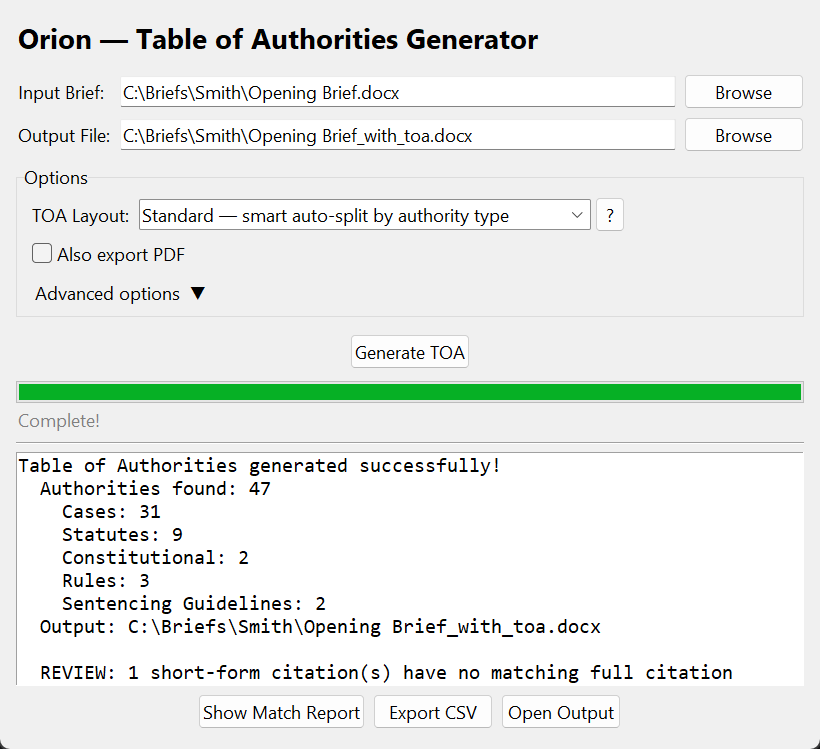
- Orion writes a new copy of the brief with the table inserted, hyperlinked to each first citation, and tells you which short-form citations it could not match. Your original file is untouched.
Time to generate: about fifteen seconds for a typical brief. Built by a former deputy federal public defender, now in federal criminal and civil practice, for his own filings, and tested against real briefs.
What it handles
Authorities
- Cases: reporters, slip opinions, Westlaw and Lexis cites
- Statutes, session law, and state codes
- Regulations and the Federal Register
- Court rules: federal, local, and state
- Constitutional provisions
- Sentencing Guidelines and model codes
- Secondary sources: books, articles, newspapers, reports, websites
Citation handling
- Standard federal citation form, as you already write it
- Id., supra, and short-form resolution
- Citing and quoting parentheticals
- Passim and page-range collapsing
- Flags short-form citations whose full citation never appears
- California Style Manual: coming soon
Output
- A new copy of your brief with the table inserted; the original is untouched
- A choice of table layouts to suit the court and your practice
- Entries hyperlinked to the first citation in the brief
- Optional PDF export
- A match report showing how each citation was read
What it does not do
- It does not check that a citation exists, is current, or is correctly formatted. You review the table before filing, as you would any table.
- It does not read, index, or touch any file other than the one you give it.
- It does not catch references made only in prose ("the Gwaduri court").
- It does not open password-protected documents.
Built for lawyers who take confidentiality seriously.
Orion was written for public defenders, CJA panel attorneys, and firms whose briefs contain sealed, privileged, or protected material.
No AI. No guessing.
Orion is conventional software: it finds citations by pattern, not by prediction. It cannot invent a case, a reporter, or a page number. Every entry in the table comes from text that is in your brief.
Your brief stays on your computer
Orion reads the brief and writes the table on your own machine. It does not upload your document, your citations, or even the file name to anyone, including us. There is no account to create and no cloud.
Nothing is sent anywhere
The only time Orion goes online is to ask this website whether a newer version of the Orion software exists. If one does, you are prompted to download it. That check sends the version number of your copy of Orion and nothing else. It never sends anything about you or your work.
Secure support
If something goes wrong, you can email us a short technical note that Orion keeps on your computer. That note records how long things took, how many citations were found, and any error messages. It never contains your brief, your citations, or the name of the file. Nothing goes to us unless you choose to send it.
Full terms, including the data-handling commitments above, are in the license agreement shipped with every copy.
Pricing
Orion does one job, so it is priced like one tool rather than a platform. Annual licenses, no per-brief metering, no usage reporting, and no bundle you have to buy to get the table.
| License | Covers | Per year |
|---|---|---|
| Individual | One attorney, CJA panel or private practice | $300 |
| Small office | Offices of up to 15 attorneys and staff | $2,500 |
| Medium office | Offices of 16 to 50 | $4,000 |
| Large office | Offices of 51 or more | $6,000 |
| Evaluation | A named office, for a fixed trial period | Free |
Office licenses are sized by the number of attorneys and litigation staff in the office: paralegals, legal assistants, and other litigation support. Investigators and non-litigation employees do not count. One license file covers the whole office. To purchase or to arrange an office evaluation, email support@oriontoa.com.
Download
Orion is a Windows desktop application. Individual users: run the installer. IT departments: the MSI supports silent, per-machine installation and a machine-wide license file.
Go to downloads